As an Amazon Associate we earn from qualifying purchases. Product links on this page may be affiliate links.
Last reviewed: November 2026. Sources and prices checked on ring.com on November 2, 2026. We have not handled these faceplates ourselves: everything below is what Ring states.
Ring sells a faceplate for each of its current doorbells, at $14.99 ($19.99 for the Elite), and each one fits only the model it names. So first identify your doorbell, which takes a minute because Ring renamed its doorbells in 2026 and the faceplate listings still use the old names. The original Video Doorbell Pro still has faceplates on sale. The faceplate for the Video Doorbell 3, 3 Plus and 4 is discontinued.
Table of Contents
Step 1: find your doorbell's name
On August 5, 2026, Ring changed its product names. In its words, "generational labels like "2nd Gen" were replaced with resolution identifiers such as "2K" or "4K."" and "the name change is cosmetic only." The faceplate pages still use the old names, so match yours here:
| Name on the faceplate listing | Name since 2026 |
|---|---|
| Battery Doorbell Plus (2nd Gen) | Battery Doorbell 2K Plus |
| Battery Doorbell Pro (2nd Gen) | Battery Doorbell 4K Pro |
| Wired Doorbell Plus (2nd Gen) | Wired Doorbell 2K Plus |
| Wired Doorbell Pro (3rd Gen) | Wired Doorbell 4K Pro |
| Wired Doorbell Elite (2nd Gen) | Wired Doorbell 4K Elite (renamed July 21, 2026) |
Two older doorbells were renamed earlier. Ring's support pages refer to the "Wired Doorbell Plus (formerly Video Doorbell Pro)" and the "Wired Doorbell Pro (formerly Video Doorbell Pro 2)." Watch the overlap: "Wired Doorbell Plus (Video Doorbell Pro)" is the original Pro, while "Wired Doorbell Plus (2nd Gen)" is a newer, different doorbell, now the Wired Doorbell 2K Plus. They take different faceplates.
Step 2: the faceplate that fits
| Faceplate listing (Ring) | Fits | Colors | Price on ring.com, Nov 2, 2026 |
|---|---|---|---|
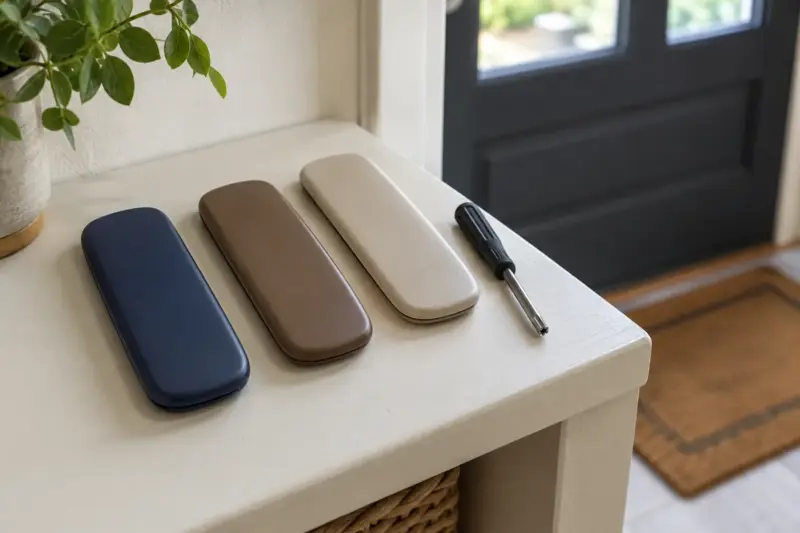
| Interchangeable Faceplate | Battery Doorbell Plus (2nd Gen) and Battery Doorbell Pro (2nd Gen) | Polished Night Navy, Polished Mocha, Polished Sandstone | $14.99 |
| Interchangeable Faceplate | Wired Doorbell Plus (2nd Gen) | Same three polished colors; one was out of stock | $14.99 |
| Interchangeable Faceplate | Wired Doorbell Pro (3rd Gen) | Same three polished colors | $14.99 |
| Interchangeable Faceplate | Wired Doorbell Elite (2nd Gen) | Same three polished colors | $19.99 |
| Interchangeable Faceplate | Wired Doorbell Plus (Video Doorbell Pro), the original Pro | Galaxy Black, Night Sky, Blue Metal, Blueprint, Pearl White, Firecracker, Ivy Leaf | $14.99 |
| Interchangeable Faceplate | Wired Doorbell Pro (Video Doorbell Pro 2) | 17 colors, several out of stock | $14.99 |
Each listing names the doorbells it supports, and the original Pro's is explicit: "*Compatible with Ring Wired Doorbell Plus (Video Doorbell Pro) only." Ring also lists a separate Ring Elite Faceplate in silicon bronze and white bronze at $129.99; its page does not name the doorbell it fits, so check with Ring before buying it.
→ Ring doorbell faceplates on Amazon (check that the listing names your exact model)
Step 3: change the faceplate
Ring's faceplate guide covers two kinds of doorbell. Which one you have shows on the faceplate listing: the newer Wired Doorbell Plus (2nd Gen) and Pro (3rd Gen) faceplates are "detached with the push-pin tool that was included with your doorbell," while the original Pro and the Pro 2 faceplates secure "with your doorbell's existing security screw."
- "Use the included removal tool to gently press the orange button on the bottom of the doorbell."
- "Pull the bottom edge of the faceplate toward you to remove."
- "Slide the faceplate into the slot under the camera. Then swing down the bottom of the faceplate until it clicks into place."
Doorbells with a security screw
- Remove the security screw with "the star-shaped bit (T15 Torx) screwdriver that came with your device."
- "Pull the bottom edge of the faceplate toward you to remove."
- Slide the new faceplate into the slot under the camera and swing the bottom down until it clicks.
- Put the security screw back with the same T15 bit.
Faceplates you can no longer buy from Ring
The faceplate for the Video Doorbell 3, Video Doorbell 3 Plus, Video Doorbell 4 and the first Battery Doorbell Plus and Battery Doorbell Pro shows "We're sorry, this item is discontinued." on ring.com. If you own one of those, Ring no longer sells a replacement color.
FAQ
Do Ring faceplates fit other Ring doorbells?
Only the models each listing names. The original Pro's faceplate says it is compatible with that doorbell "only," and the others list their supported devices. Check your doorbell's name in Step 1 first.
What screwdriver do I need to change a Ring faceplate?
For doorbells held by a security screw, Ring says to use the star-shaped T15 Torx bit that came with the doorbell. Newer models release with the push-pin tool included in the box.
Is the Ring Video Doorbell Pro still sold?
Ring now calls it the Wired Doorbell Plus (formerly Video Doorbell Pro), and its faceplates are still on sale in seven colors.
More on Ring: do you need a Ring Bridge?
Sources
Ring support: product name changes, Video Doorbell Pro information, Wired Doorbell Pro safety and compliance and changing a doorbell faceplate. Ring store: doorbell accessories and the faceplate pages linked in the table, plus the discontinued Video Doorbell 3 and 4 faceplate.
Sources last checked November 2, 2026.
If you'd like to read other articles similar to Ring Doorbell Faceplates: Which One Fits Your Doorbell, and How to Change It You can visit the category Smart Security.
You may also enjoy reading